
A Visual Guide to Keyword Targeting and On-Page SEO

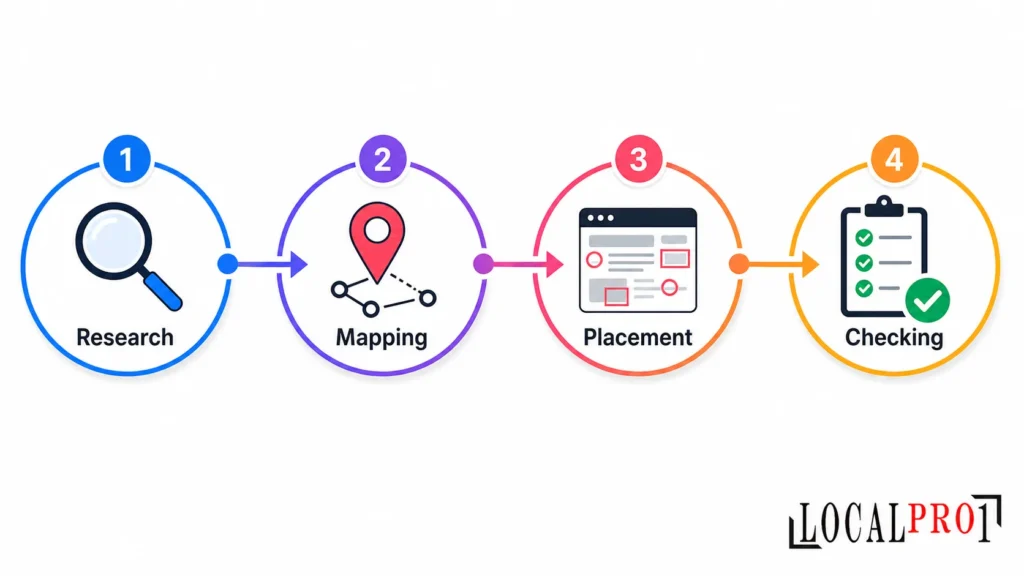
You publish a solid page, share it, and wait. Weeks later it still sits on page four. The writing is fine, but nobody decided what the page should rank for, so every element points in a slightly different direction. This visual guide to keyword targeting and on-page SEO fixes that with a simple workflow: choose, map, place, and check.
- Quick summary
- What Is Keyword Targeting and Why Does It Matter for On-Page SEO?
- How Do You Choose the Right Keyword for a Page?
- What Are the 4 Types of Search Intent?
- How Do You Map Keywords to Pages?
- Where Should You Place Your Keyword on the Page?
- How Do You Optimize Content Beyond Keywords?
- How Do You Optimize for AI Search and Featured Snippets in 2026?
- What Keyword Targeting Mistakes Should You Avoid After Recent Spam Updates?
- Your On-Page SEO Checklist
- Real Example: Optimizing a Local Service Page
- Final Thoughts
- Frequently Asked Questions
LocalPro1 treats this as the first review on any page that underperforms, and you can run the same process on your own site today.
Quick summary
- Give every page one primary keyword and one clear job.
- Check search intent before you write a single heading.
- Use keyword mapping so your pages never compete with each other.
- Place keywords where readers expect them, then stop.
- Run an on-page SEO checklist before you publish.
Visual: a hero infographic of the four-step workflow (research, mapping, placement, checking).
What Is Keyword Targeting and Why Does It Matter for On-Page SEO?
Keyword targeting is the process of choosing the specific search phrase a page should rank for, then shaping the page around the need behind that phrase. On-page SEO is how you carry that choice out through titles, headings, copy, images, and links.
Without a target, on-page work becomes guesswork. You polish a page that has no destination. Search engines also understand topics and related concepts now, not just exact words. A page for a Brooklyn dentist should naturally cover emergency visits, insurance, and nearby transit instead of repeating one phrase. The page that explains the whole topic usually beats the page that repeats the keyword.
Visual: a simple diagram showing Keyword, then Page, then Searcher intent.
How Do You Choose the Right Keyword for a Page?
Choose the phrase that best describes what the page offers, that you can realistically compete for, and that leads to a business result. Run three quick checks:
- Relevance: can this page fully satisfy the person typing the phrase?
- Realistic difficulty: if the results are dominated by huge publishers, a more specific phrase may suit a smaller site better.
- Business value: traffic that never becomes a call, booking, or sale rarely justifies the effort.
Short-tail phrases such as “accountant” are broad and competitive. Long-tail phrases such as “accountant for restaurant owners in Queens” attract fewer searches but usually show clearer intent.
| Keyword type | Purpose | Example |
| Primary | The main target of the page | emergency plumber Brooklyn |
| Secondary | Broadens the topic | burst pipe repair |
| Long-tail | Specific, high intent | emergency plumber for burst pipe in Brooklyn |
| Related terms | Adds topical depth | leak detection, shut-off valve |
What Are the 4 Types of Search Intent?
Search intent is the reason behind a query. The four types are informational (learn something), navigational (reach a specific site), commercial (compare options), and transactional (take action). To confirm intent, search the phrase yourself and study the results. If they are all guides, a service page will struggle. If they are all service pages, a blog post will struggle too.
| Example query | Intent | Best page type |
| what is schema markup | Informational | Guide |
| best accounting software for contractors | Commercial | Comparison page |
| hire an immigration lawyer in Manhattan | Transactional | Service page |
| client portal login | Navigational | Login page |
Mixed-intent queries are the tricky case. When the results show both guides and services, answer the question in the opening section, then guide readers toward the service.
How Do You Map Keywords to Pages?
Keyword mapping assigns one primary keyword to one URL. It prevents keyword cannibalization, which happens when two pages compete for the same query and neither performs well. Follow these steps:
- List your current pages and the pages you still need.
- Assign each one a primary keyword and two to four supporting phrases.
- Record the intent and page type.
- Rank pages by business priority.
- Check the map for overlap before writing anything new.
| Keyword | Intent | Page type | Priority |
| on-page SEO checklist | Informational | Blog post | Medium |
| local SEO for dentists | Transactional | Service page | High |
To spot keyword cannibalization, search your own site for a phrase and see which URLs appear. Then pick a fix. Merge and redirect when two pages say the same thing. Reposition when they serve different intents but share wording, for example by turning one into a pure guide. Redirect an old page that no longer has a purpose.
Visual: a designed keyword map table or spreadsheet screenshot.
Where Should You Place Your Keyword on the Page?
Think of this section as the map at the center of a visual guide to keyword targeting and on-page SEO. Picture a mock web page with numbered hotspots, each one a spot where keyword placement matters:
- Title tag: primary phrase near the front, written to earn the click.
- Meta description: a plain summary that gives a reason to click.
- URL slug: short, lowercase, hyphenated, and descriptive.
- H1 and subheadings: one H1 states the page’s promise, while H2s use related phrases and real questions.
- First 100 words: state the topic clearly and early.
- Body copy: use natural variations and synonyms.
- Image file names and alt text: describe the image honestly, adding the keyword only if it fits.
- Internal anchor text: descriptive and varied.
Where keywords should not be forced
Watch for these stuffing signs: unnatural repetition, headings packed with variations, alt text that reads like a list, and paragraphs that recite every neighborhood you serve. If a sentence sounds odd when read aloud, rewrite it. Placement should serve the reader first.
Visual: an annotated page diagram, plus a “Do vs Don’t” comparison graphic.
How Do You Optimize Content Beyond Keywords?
Answer the main question early, then cover the related questions a reader would ask next. Use short paragraphs, descriptive headings, lists, and tables so the page is easy to scan.
Add material nobody else can copy: your own photos, process notes, pricing explanations, and local details. This matters most for multi-location businesses. Cloning one service page and swapping the borough name adds no value. Each location page needs its own information, such as service areas, typical constraints, and real transit or parking details. Finish with the basics: a mobile-friendly layout, fast loading, and schema markup where it fits.
How Do You Optimize for AI Search and Featured Snippets in 2026?
Place a short, direct answer under a question-style heading, then expand with detail. Answer engines and snippet features favor content that is easy to extract: one or two sentence definitions, numbered steps, and clearly labeled tables.
Keep your entities consistent. Use the same business name, address format, and service names across every page. Show who wrote the content, and update it when facts change. Still write for people, because a good answer should make readers want to read the rest.
What Keyword Targeting Mistakes Should You Avoid After Recent Spam Updates?
Search engines have released several spam updates in 2026, so risky shortcuts deserve extra caution. Avoid these:
- Fixed keyword density rules: they push you toward unnatural writing.
- Many near-identical pages at scale: thin duplicates add noise, not value.
- Mass-produced AI content without human review: accuracy and originality suffer.
- Hidden or misleading text: it is a deceptive tactic.
- Several unrelated keywords on one page: it dilutes the page’s focus.
Recent updates reward helpful, original, people-first content. A clean on-page foundation is the safer long-term approach.
Visual: a “safe vs risky” checklist graphic.
Your On-Page SEO Checklist
Use this on-page SEO checklist before every publish:
- One primary keyword mapped to the page
- Title and meta description written for clicks
- One H1 and a logical H2 structure
- Keyword used naturally in the intro
- Descriptive URL, file names, and alt text
- Internal and external links reviewed
- Mobile layout and speed checked
- Facts reviewed for accuracy and originality
Real Example: Optimizing a Local Service Page
LocalPro1 often starts a page review by comparing the page’s current state against its intended target. Here is an illustrative scenario, not a client result. A physical therapy clinic in Queens has a page titled “Our Services,” an H1 that says “Welcome,” a generic intro, and no links to related pages.
After optimization, the title reads “Physical Therapy in Queens for Back and Knee Pain,” and the H1 matches it. The intro says who the clinic helps and how to book. The H2s cover conditions treated, what a first visit involves, insurance questions, and directions with transit and parking details. A short FAQ answers real patient questions, and internal links point to related condition pages. If you want a specialist to audit your own pages, explore our On-Page SEO Services in New York.
Visual: a before and after mock-up of the page.
Final Thoughts
Good rankings rarely come from one trick. They come from choosing a clear target, matching search intent, mapping keywords carefully, and placing them with restraint. Keep this visual guide to keyword targeting and on-page SEO beside you the next time you publish. If you want help applying for it, LocalPro1 is ready to look at your pages, so contact us for a free consultation.
Frequently Asked Questions
How many times should I use a keyword on a page?
There is no magic number. Use the primary keyword where it reads naturally, and let thoughtful keyword placement in the title, H1, and opening paragraph do most of the work.
What is the difference between keyword targeting and keyword research?
Keyword research finds possible phrases and shows their demand. Keyword targeting is the decision to assign a chosen phrase to one page and build that page around it.
Can I target more than one keyword on a page?
Yes, if the keywords share the same search intent and describe one topic, such as a main phrase and its close variations. Unrelated keywords belong on separate pages.
How long does on-page SEO take to show results?
It varies with competition, site authority, and how often search engines revisit the page. Many changes take several weeks or longer to show, so track progress instead of expecting overnight movement.
Is keyword density still a ranking factor?
There is no target percentage to hit. Clear writing that covers the topic fully works better than counting repetitions.
Ready to Grow Your Business Online?
Get a custom strategy built around your goals. Our team will review your current marketing and show you exactly where the growth opportunities are.
- Free 30-minute strategy call
- Custom growth roadmap
- No obligation or hidden fees