
What is the difference between SEO and technical SEO?
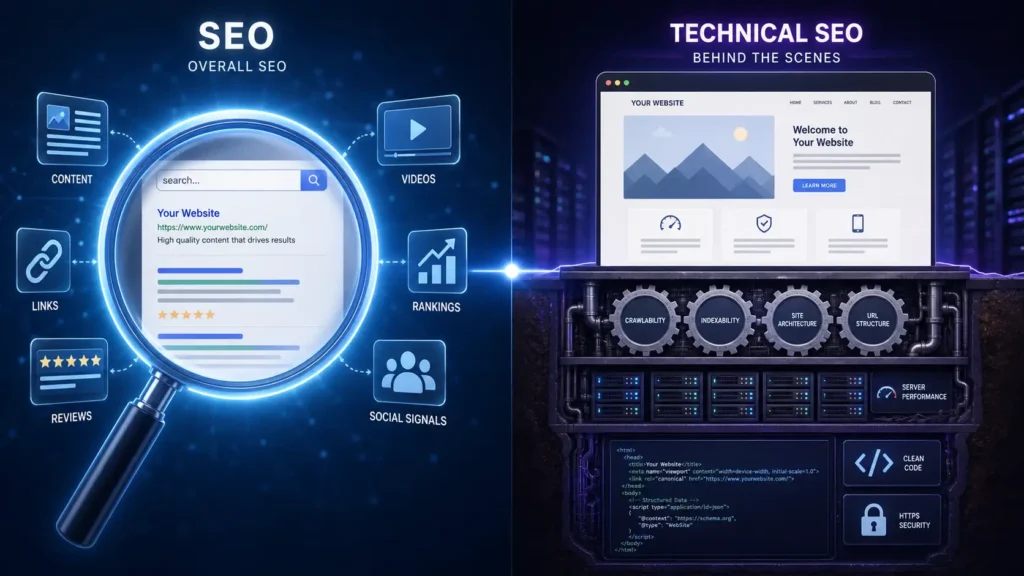
You hit publish on a sharp, well-researched article. A month later it still hasn’t appeared on Google, and you can’t tell what went wrong. If that sounds familiar, you’ve run into the question behind this guide: what is the difference between SEO and technical SEO?
- The Short Answer
- What Is SEO?
- What Is Technical SEO?
- SEO vs Technical SEO: Side-by-Side
- A Real-World Example
- How They Work Together
- Technical SEO in the Age of AI Search
- Staying Safe After Google’s September 2026 Spam Update
- Common Mistakes and Myths
- Tools and Skills for Each Side
- Final Thoughts
- Frequently Asked Questions
Here’s the quick answer. SEO is the full effort of earning visibility in search results. Technical SEO is one part of that effort, and it deals with how your website works behind the scenes so search engines can reach and read your pages. This LocalPro1 guide gives you clear definitions, a side-by-side comparison, a real example, and a simple way to decide what to fix first.
The Short Answer
SEO is the full effort of making a site visible, trusted, and useful to searchers. Technical SEO is the narrower job of making sure search engines can crawl, render, and index your pages without friction. SEO decides whether a page deserves to rank. Technical SEO decides whether it can be considered at all.
Think of SEO as the whole strategy and technical SEO as the foundation it stands on.
What Is SEO?
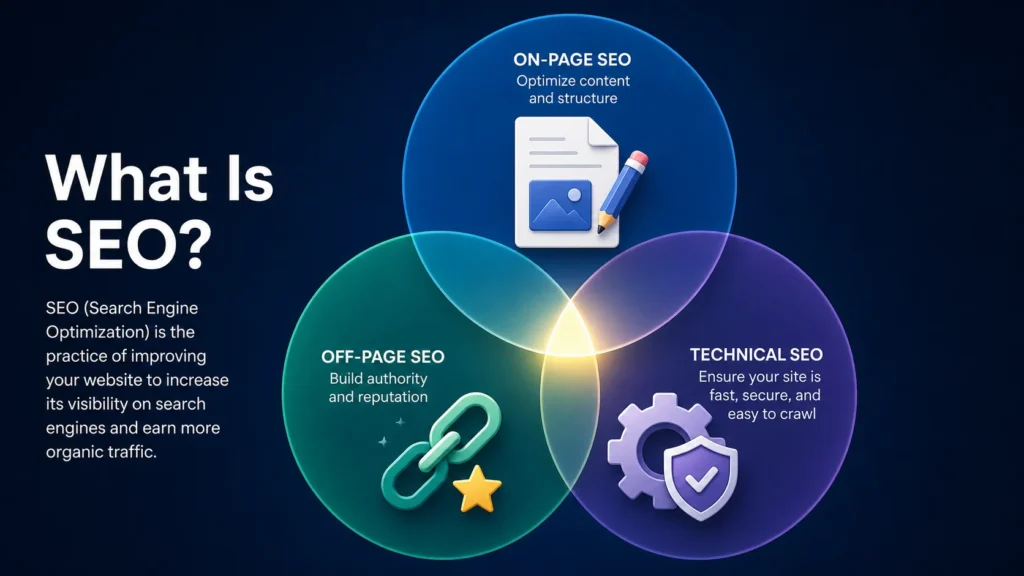
SEO, short for search engine optimization, is everything you do to make your site easier to find and more worth choosing when someone types a question into a search box. It starts with search intent. A person searching “emergency plumber near me” wants a phone number and proof that someone can show up tonight. A person searching “how does a water heater work” wants an explanation. Matching the page to that need is the heart of the craft.
SEO usually breaks into three areas:
- On-page SEO and content: titles, headings, copy, images, internal links, and how well a page answers the query.
- Off-page SEO: backlinks, brand mentions, reviews, and reputation earned beyond your own pages.
- Technical SEO: the infrastructure that lets search engines access and understand everything above.
That last item matters. Technical SEO sits inside SEO, not beside it.
What Is Technical SEO?
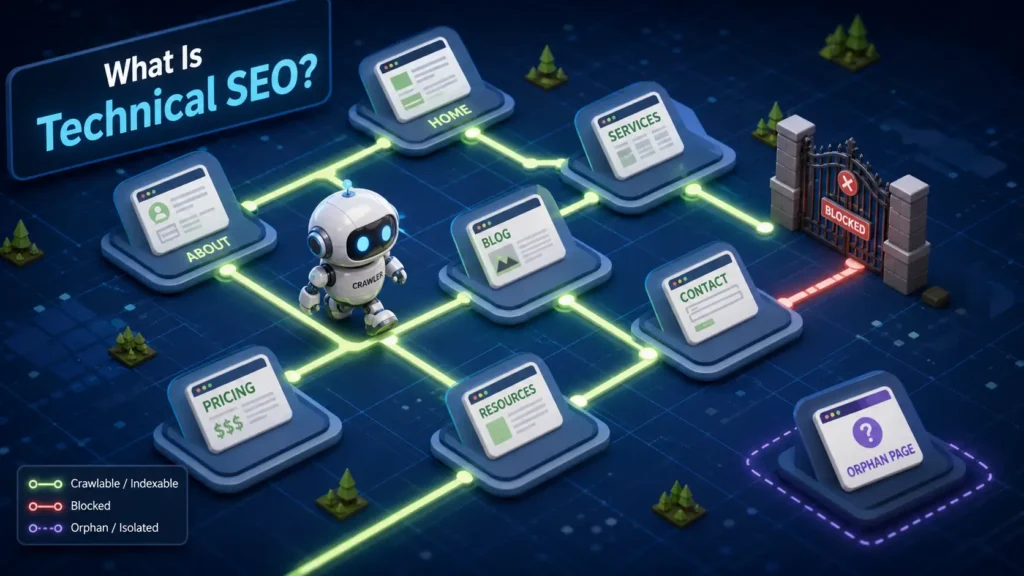
Technical SEO covers everything that helps search engines access, crawl, render, and understand your pages. Visitors rarely notice it when it works. When it breaks, nothing else you do gets a fair chance.
The core areas are:
- Crawlability: robots.txt rules, internal links, and a structure bots can follow without hitting dead ends.
- Indexing: XML sitemaps, noindex tags, and canonical tags that tell Google which version of a page counts.
- Site speed and Core Web Vitals: how quickly the main content appears, how stable the layout stays, and how fast the page reacts to a tap.
- Mobile usability: layouts and tap targets that work on a phone, with the same content you show on desktop.
- Security and URLs: HTTPS, clean URL patterns, and tidy redirects.
- Structured data: schema markup that labels products, businesses, articles, and questions.
- Duplicates and broken links: clutter that splits signals and wastes crawl time.
One edge case is worth knowing. If you block a page in robots.txt and also add a noindex tag, the tag can never do its job. Bots are not allowed to open the page, so they never read the instructions, and the URL can linger in results.
SEO vs Technical SEO: Side-by-Side
| Factor | SEO (overall) | Technical SEO |
| Scope | Content, links, reputation, and site health | Site infrastructure and how bots process it |
| Main goal | Earn rankings, clicks, and trust | Make pages crawlable, renderable, and indexable |
| What visitors notice | Text, images, offers, and pages | Almost nothing when it works |
| Who usually handles it | Marketers, writers, PR, strategists | Developers and technical SEO specialists |
| Typical tasks | Keyword research, content, link earning | Fixing crawl errors, redirects, speed, schema |
| How you measure it | Rankings, organic clicks, conversions | Index coverage, crawl reports, Core Web Vitals |
| Skills needed | Research, writing, outreach | HTML, servers, JavaScript, site architecture |
| How often you revisit it | Continuously, with each content push | After launches and migrations, plus regular audits |
Broader SEO earns attention, and technical SEO protects it. Trouble often starts when one side gets all the effort.
A Real-World Example
These are hypothetical scenarios, built from patterns that come up often when sites get reviewed.
Scenario A. A Brooklyn dental clinic publishes a detailed teeth whitening guide, complete with a clear price range and input from a real dentist. Weeks pass and nothing happens. The cause is a noindex setting that was switched on while the site was being built and never removed at launch. The content effort was excellent, but one line of code told Google to stay away. That is a technical problem, and rewriting the article would never fix it.
Scenario B. A Manhattan furniture store has a fast, secure, fully crawlable site. But category pages carry two lines of generic copy, and product descriptions are copied from the supplier. Nothing helps a shopper choose between a sofa and a sectional. Google can reach every page, yet no page stands out as the best answer. This is an on-page SEO and content problem.
Scenario C. An online store has filter menus where color, size, and price combine into thousands of URL variations. Bots spend their visits on near-identical pages while new products wait to be discovered. The technical fix is controlling those URLs with canonicals, internal link choices, and crawl rules. The content fix is giving the few filtered pages that match real searches, like “black leather sofas,” unique and useful copy.
Strong content on a blocked site fails. A flawless site with nothing to say fails too.
How They Work Together
So, what is the difference between SEO and technical SEO in daily work? The order tells the story. Technical SEO lets Google find and process a page. Broader SEO decides whether that page earns a good position. Technical work is also a site-wide baseline, while content and on-page SEO decide relevance for each individual query.
When a page underperforms, ask these questions in order:
- Is the page indexed?
- If not, can search engines crawl and render it?
- If it is indexed, does it match the search intent behind the keyword?
- Does the page load and behave well on a phone?
When to Fix Technical SEO First
- A new or migrated site: check redirects, canonicals, and sitemaps before touching content.
- Pages missing from the index: in Search Console, “Discovered, currently not indexed” means Google knows the URL but hasn’t crawled it yet. “Crawled, currently not indexed” means Google visited and chose to skip it, which more often points to quality or duplication than to a pure technical fault.
- A sudden traffic drop after a developer release: look for stray noindex tags, changed robots rules, or broken templates.
- A slow or clumsy mobile experience: layout jumps and unresponsive buttons push visitors away.
When to Focus on Broader SEO First
- A healthy, indexed site with flat rankings: the infrastructure is fine, so relevance is the likely gap.
- Thin or interchangeable content: if ten competitors say the same thing, none of you stands out.
- Pages stuck on page two or three: the page may not match search intent, or rivals may have stronger reviews and reputation.
Technical SEO in the Age of AI Search
AI-powered search features pull from pages that search engines can already reach and understand, so the basics matter as much as ever. Three practical checks help:
- Rendering: if key content only appears after heavy JavaScript runs, some crawlers may see an empty shell. Check the rendered HTML, not just what you see in your browser.
- Accidental blocking: a firewall rule or a stray robots.txt line can hurt crawlability for bots you actually want.
- Structure: descriptive headings, short direct answers near the top, and structured data that matches the visible page make information easier to extract and attribute.
None of this guarantees a mention in an AI answer. It simply removes the avoidable reasons for being left out.
Staying Safe After Google’s September 2026 Spam Update
Google released the September 2026 spam update on 24 September, and it finished rolling out on 8 October after about two weeks. Google called it a normal spam update with no new policies attached, and it did not name the specific tactics it was aimed at. Separately, a broad core update began rolling out on 10 November, so dates matter when you try to explain a ranking change. Google September 2026 Spam Update Complete: 13 Days, 16 Hours +3
Habits that hold up under any update:
- Write for people first, not for keyword counts.
- Avoid mass-produced or near-duplicate pages, including location pages that only swap the city name.
- Don’t hide text, stuff keywords, or use deceptive redirects.
- Don’t publish content on your site just to borrow its ranking power.
- Fix technical shortcuts that look manipulative, such as doorway pages and cloaking.
If your rankings shifted, audit content quality and technical health, and compare Search Console data from before and after the update dates, before blaming the update.
Common Mistakes and Myths
Most confusion around what is the difference between SEO and technical SEO comes from four myths.
- “Technical SEO is only for developers.” Developers often do the fixing, but marketers should read the reports. A noindex tag or a broken sitemap is something anyone can catch with Search Console open.
- “More technical fixes mean better rankings.” Technical SEO removes obstacles. It does not add relevance. Once a site is crawlable and reasonably fast, more tweaking rarely beats improving the content.
- “SEO is just keywords.” Keywords are one piece. Search intent, page experience, reputation, and clear structure carry equal weight.
- “Fix it once and forget it.” Redesigns, new plugins, and fresh templates can bring old problems back. Recheck after every major change.
Tools and Skills for Each Side
LocalPro1 suggests starting every technical SEO audit with two questions: can search engines reach the page, and are they allowed to index it?
A few brand-neutral tool types cover most needs:
- Google Search Console for both sides, since it shows indexing, crawl, and Core Web Vitals data.
- A site crawler to surface broken links, redirect chains, and missing tags.
- A speed testing tool to check page performance.
- A keyword research tool to map search intent before you write.
On skills, technical SEO leans on HTML, server basics, JavaScript, and site architecture. Broader SEO leans on research, writing, and outreach. If your audit turns up problems you’d rather hand off, our Technical SEO Services in New York can help.
Final Thoughts
SEO is the whole strategy. Technical SEO is the foundation that holds it up. You need both, and knowing which one is failing saves months of guesswork.
Before you publish your next article, run a quick check in Search Console for indexing and speed issues. If you’d like a second opinion on what you find, contact us and the LocalPro1 team will walk through it with you.
Frequently Asked Questions
Is technical SEO part of SEO?
Yes. It is one branch of SEO, alongside on-page SEO and off-page SEO. Technical SEO handles site infrastructure, while the other branches handle content and authority.
Can I do SEO without technical SEO?
You can publish content and earn links without touching the technical side, but it’s risky. A blocked, slow, or broken site can waste that effort. At the very least, confirm your pages are indexable.
Which is harder to learn?
It depends on your background. Technical SEO feels steeper if you haven’t worked with code or servers. Broader SEO takes time because research, writing, and outreach all require judgment that only builds with practice.
How often should I run a technical SEO audit?
Twice a year works for most sites, plus after any redesign, migration, or major plugin change. Large or fast-changing sites, like online stores, benefit from checking indexing and crawl reports monthly.
Do small websites need technical SEO?
Yes, though the workload is lighter. A small site rarely faces crawl budget limits, but a stray noindex tag, weak crawlability, or slow mobile pages can still hold it back.
Ready to Grow Your Business Online?
Get a custom strategy built around your goals. Our team will review your current marketing and show you exactly where the growth opportunities are.
- Free 30-minute strategy call
- Custom growth roadmap
- No obligation or hidden fees