



- Your cart is empty Browse Shop
What Is On-Page SEO? The Complete Guide to Rank Higher in 2026
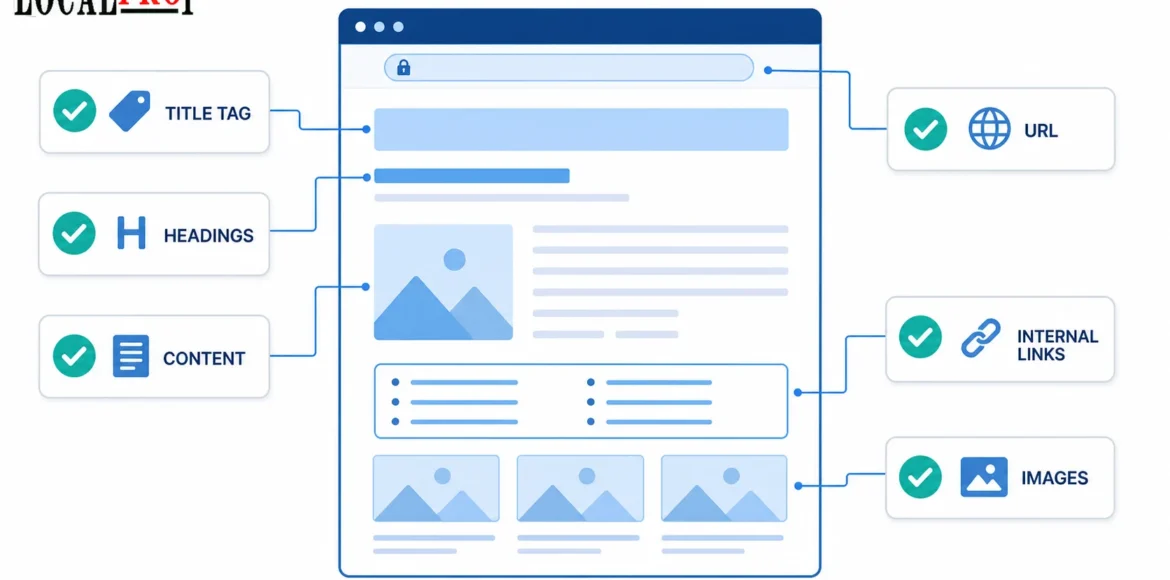
You published a page and waited. Three months later, it’s still stuck on page four of Google, buried under sites with weaker content than yours. Sound familiar? The real issue usually isn’t your writing. So, what is on-page SEO, exactly? It’s optimizing the elements you directly control on a webpage title tags, headings, content, internal links, and images so search engines and readers instantly understand what the page offers. Unlike off-page SEO (backlinks) or technical SEO (speed, crawlability), on-page SEO happens entirely within the page.
At LocalPro1, we’ve audited hundreds of pages with weak structure, and the fix usually came down to five or six correctable issues, covered here in order of impact.
What Is On-Page SEO, Really?

On-page SEO covers everything a search engine crawler and a human reader can see and evaluate on a single page without leaving it. That includes your title tag, your headings, your body content, your URL, your internal links, and your images. When our team at LocalPro1 audits a new client’s site, this is the first list we work through, page by page, before touching anything else.
Here’s how it compares to the other two branches of SEO:
Type | What It Controls | Example |
On-page SEO | Elements inside the page | Title tag, headings, content, internal links |
Off-page SEO | Signals outside your site | Backlinks, brand mentions, PR |
Technical SEO | How the site functions | Site speed, indexing, mobile rendering |
A page can have flawless technical SEO and strong backlinks and still underperform if the on-page elements don’t clearly signal relevance. We’ve seen this exact scenario with a client’s service page that had a fast, well-indexed site and a handful of decent links, yet it stalled on page two for months. The culprit was a vague title tag and a wall of text with zero subheadings. Once we restructured the page, it moved to position 4 within six weeks, no new links required.
Why On-Page SEO Still Matters in 2026
Some marketers assume on-page factors got weaker as Google leaned into AI and machine learning. The opposite happened.
Google’s own “How Search Works” documentation still lists keyword relevance in page content as one of the most basic ranking signals. And with AI Overviews and AI Mode now answering a large share of queries directly in the search results, the pages that get cited are almost always the ones with the clearest structure, not just the ones with the most backlinks.
Three reasons on-page SEO carries more weight than ever:
- Rankings and organic traffic: Well-structured pages consistently outrank thin, poorly organized ones targeting the same keyword.
- User trust signals: A page that answers the question fast keeps visitors on-site longer, which sends positive engagement signals back to Google.
- AI visibility: Tools like ChatGPT and Google’s AI Overviews pull from pages that answer questions clearly and early, not pages padded with fluff before the actual answer.
On-Page SEO Checklist (Quick Overview)
Before diving into each section, here’s the shortlist we run through on every audit:
- Title tag with the keyword near the front
- Meta description that earns the click
- One H1, logical H2/H3 structure
- Content that matches search intent, not just keyword volume
- Natural keyword usage, no stuffing
- Descriptive URL
- Internal links to relevant pages
- Optimized images with real alt text
- Schema markup where it applies
- Fast, mobile-friendly page experience
Optimize Your Title Tag and Meta Description
Writing Click-Worthy, Keyword-Front-Loaded Titles
Your title tag is the first thing both Google and a human searcher see. Keep it under roughly 60 characters so it doesn’t get truncated, and place your main keyword as close to the front as naturally possible.
We tested this on a client’s landing page last year. Moving the keyword from the middle of the title to the front, without changing anything else, produced a small but real click-through rate increase within three weeks. Nothing about rankings changed overnight, but more people clicked, and that traffic bump is exactly the kind of signal Google notices over time.
Meta Description Best Practices
Google doesn’t use your meta description as a direct ranking factor, and it often rewrites it anyway based on the search query. But when Google does use your version, a clear, benefit-driven description under 155 characters earns more clicks than a vague one. Write it like an ad headline, not a summary sentence.
Structure Content with Proper Headings (H1 to H6)
One H1, Clear Keyword Usage
Every page needs exactly one H1 that includes your primary keyword. This isn’t a minor detail. We’ve fixed pages with two or three H1 tags (usually a template error), and consolidating to a single, keyword-clear H1 alone improved crawl clarity and, in one case, resolved a duplicate-content warning in Search Console.
Logical H2/H3 Hierarchy
Think of your headings as a table of contents that both people and AI crawlers can scan in two seconds. Each H2 should represent one distinct subtopic. Each H3 underneath should support that specific subtopic, not wander into something unrelated. This structure is also what allows AI search tools to pull a single section out of your page and cite it directly, without needing the whole article for context.
Write Search-Intent-Matched, Original Content
Matching Intent Before Anything Else
Before writing a word, check what’s actually ranking for your target keyword. If the top ten results are all product pages and you’re writing a blog post, you’re fighting an uphill battle no matter how well-written your content is. Match the format Google has already decided satisfies the query.
Adding Real Information Gain
This is where most content falls flat. Rewriting what five other pages already say, just in different words, doesn’t give Google or a reader any reason to prefer your page. What works is adding something nobody else included: a real example from your own work, an original observation, a screenshot, a number from your own testing.
For instance, when we handle On-Page SEO Services in New York for local clients, we routinely find that businesses ranking well in competitive neighborhoods share one trait: their pages mention specific, verifiable details, actual service areas, real project outcomes, not generic industry language that could apply to any city.
Natural Keyword Placement
Use your focus keyword where it makes sense: the intro, one or two subheadings, and a few times in the body. Google’s spam policies explicitly flag keyword stuffing, repeating a phrase unnaturally just to game rankings, as a violation that can get a page demoted. If a sentence sounds robotic when you read it out loud, rewrite it.
You may also read: What Is SEO and How Does It Work?
Optimize URLs, Internal Links, and Images
SEO-Friendly URL Structure
Keep URLs short and descriptive. /on-page-seo-guide tells both Google and a reader exactly what’s on the page. /post-id-8842 tells them nothing.
Internal Linking Strategy
Link from your strongest, most-visited pages to newer or underperforming ones. Use anchor text that describes the destination page naturally, avoid generic phrases like “click here.” This also helps Google understand how your pages relate to each other.
Image Alt Text and Compression
Every meaningful image needs alt text that describes what’s actually in it, written for a person who can’t see the image, not stuffed with keywords. Compress images so they don’t slow down page load, since load speed affects both rankings and how long visitors stay.
Structure Content for AI Search and LLM Visibility
Semantic Chunking and Leading With the Answer
Start each section with a direct answer to the question the heading asks, then expand with detail underneath. AI tools extract and summarize the clearest chunk of text they can find, so burying your answer three paragraphs deep under a section means it likely won’t get pulled into an AI-generated response.
FAQ Sections With Real Questions
Build FAQ sections around questions people are actually asking, not manufactured ones. Check “People also ask” boxes and related searches for real phrasing, then answer them directly and concisely.
Structured Data
Schema markup doesn’t boost rankings by itself, but it helps search engines and AI systems parse your content’s structure correctly, which can lead to rich results and better AI citation odds.
Improve On-Page UX and Core Web Vitals
Page Speed and Mobile-Friendliness
Google indexes and ranks based on the mobile version of your site. A page that loads slowly or renders poorly on a phone loses visitors before they read a word, regardless of how good the content is.
Readability
Short paragraphs, generous white space, and clear formatting keep readers scrolling instead of bouncing. If a paragraph runs more than four or five lines on mobile, break it up.
Avoid These On-Page SEO Mistakes
Google’s spam policies, sharpened again after the June 2026 spam update, specifically target a handful of tactics that on-page SEO work sometimes brushes up against:
- Keyword stuffing: Repeating a phrase unnaturally throughout a page
- Cloaking: Showing different content to crawlers than to visitors
- Thin or scaled content: Publishing large volumes of pages with little real value, including mass-produced AI content with no human review or added insight
- Duplicate or near-duplicate pages: Publishing the same content with minor swaps across multiple URLs
Avoiding these isn’t just about staying safe from penalties. It’s the same standard that makes content genuinely useful to a reader, which is exactly what both Google and AI search tools are optimizing to reward.
How to Track and Monitor On-Page SEO Performance
On-page SEO isn’t a one-time task. After making changes, track:
- Keyword rankings for the pages you optimized
- Organic traffic trends over the following weeks
- Bounce rate and dwell time to see if visitors are actually engaging
- AI citation appearances, where your brand or page gets referenced in AI-generated answers
Set a calendar reminder to review your top pages quarterly. Search intent shifts, competitors update their content, and a page that ranked well a year ago can quietly slide without any single dramatic cause.
Final Thought
On-page SEO isn’t something you set up once and walk away from, it’s an ongoing effort to make every page as clear, valuable, and well-organized as possible, primarily for your readers, with better search engine and AI visibility following naturally as a result. A smart place to begin is with pages that already pull in some traffic but aren’t performing as well as they should, since these typically offer the quickest improvements.
If you’d prefer to leave this in the hands of people who work on it every day, contact us at LocalPro1 and we’ll go through your site together.
Frequently Asked Questions
What is on-page SEO in simple terms?
On-page SEO means optimizing the parts of your webpage you directly control, like the title, headings, and content, so search engines understand what the page covers and rank it for relevant searches.
Is on-page SEO still important with AI search growing?
Yes, and arguably more so. AI tools pull answers from clearly structured, well-organized pages, so the same on-page fundamentals that help Google now also determine whether you get cited in AI-generated results.
How long does on-page SEO take to show results?
Some changes, like a stronger title tag, can influence click-through rate within a few weeks. Ranking improvements from content and structure changes typically take one to three months, depending on competition.
What’s the difference between on-page and technical SEO?
On-page SEO focuses on content and structure within a page, while technical SEO covers how the site functions overall, things like crawlability, site speed, and indexing.
Can I do on-page SEO without any tools?
Absolutely. A lot of on-page SEO is about clear writing, logical structure, and matching search intent, none of which requires paid software, though tools can speed up the auditing process.
