




- Your cart is empty Browse Shop
How to Manage Multiple Social Media Accounts
It is hard to keep up with online updates when you are busy caring for others. If you run an online support community, senior activity page or local care registry, the notifications never seem to stop. You want to inform your community but switching from app to app takes up your precious time.
I swear I’m going to show you a simple, stress-free way to organize your online presence without burning out. In this guide, you will learn how to create a simple weekly system, select the proper helper tools, and keep your message consistent. The fastest way to begin this task is to write your posts in one dashboard tool and schedule them to automatically deliver on all your profiles. Here’s how to handle multiple social media accounts without losing your mind.
Common Challenges of Managing Multiple Social Media Accounts
Managing multiple social media accounts sounds simple until you’re actually doing it. The problems don’t show up on day one. They show up in week three, when the notifications pile up and nobody remembers who approved what.
The biggest challenges are missed messages, inconsistent brand voice, constant platform switching, and no single view of performance across channels. These issues compound as you add more accounts, turning what should be a manageable workload into a source of daily stress and costly mistakes.
Let’s break each one down.
Missed Engagement and Slow Responses
When you’re checking Instagram DMs, X mentions, and Facebook comments in separate tabs, something always slips through. A customer question sits unanswered for hours. A complaint that needed a same-day reply gets buried under a dozen other notifications.
Response time matters more than most teams realize. Customers who reach out on social media expect a reply within a few hours, not a few days. A slow or missed response doesn’t just annoy one person; it becomes a screenshot other people see.
Burnout From Constant Platform Switching
Jumping between five different apps and dashboards all day is exhausting, and it’s not just a feeling. Task switching has a real, measurable cost on focus and output. Every time you close one tab and open another, your brain needs a moment to reorient.
Multiply that by ten accounts and a dozen daily checks, and you’ve spent a good chunk of your workday just relocating information instead of acting on it.
Inconsistent Messaging and Brand Voice
Without a shared reference point, tone drifts. One person writes formal captions for LinkedIn, another writes casual jokes for the same brand on X, and neither one checks what the other is doing. Brand voice consistency isn’t a nice-to-have; it’s what makes your audience recognize you without seeing the logo.
No Unified Reporting
If you’re pulling analytics platform by platform, you’re probably missing the bigger picture. Instagram might be driving traffic while LinkedIn quietly delivers your best leads. Without combined social media analytics and reporting, you can’t tell which channel actually earns its keep.
How Many Social Media Accounts Can One Person Realistically Manage?
One person can typically manage between five and fifteen social media accounts well, depending on posting frequency, engagement volume, and whether scheduling tools are in use. Beyond fifteen accounts, most individuals need automation, delegation, or a dedicated management platform to maintain quality and response times.
The honest answer depends less on a magic number and more on your workflow. Someone posting twice a week on three quiet brand accounts has an easier job than someone running daily content and heavy engagement across ten client accounts.
A few things shift that number up or down:
- Posting frequency. Daily content across every channel eats far more time than weekly updates.
- Engagement volume. A brand with an active, chatty audience needs more hands-on moderation.
- Tool support. A good scheduling and inbox tool can double what one person handles alone.
- Team structure. Solo operators cap out faster than someone with even one part-time assistant.
If you’re managing accounts for clients, this number matters even more, because it shapes your pricing and your promises. Overcommitting here is one of the fastest ways to lose a client’s trust.
Step-by-Step: Setting Up a System for Multiple Accounts
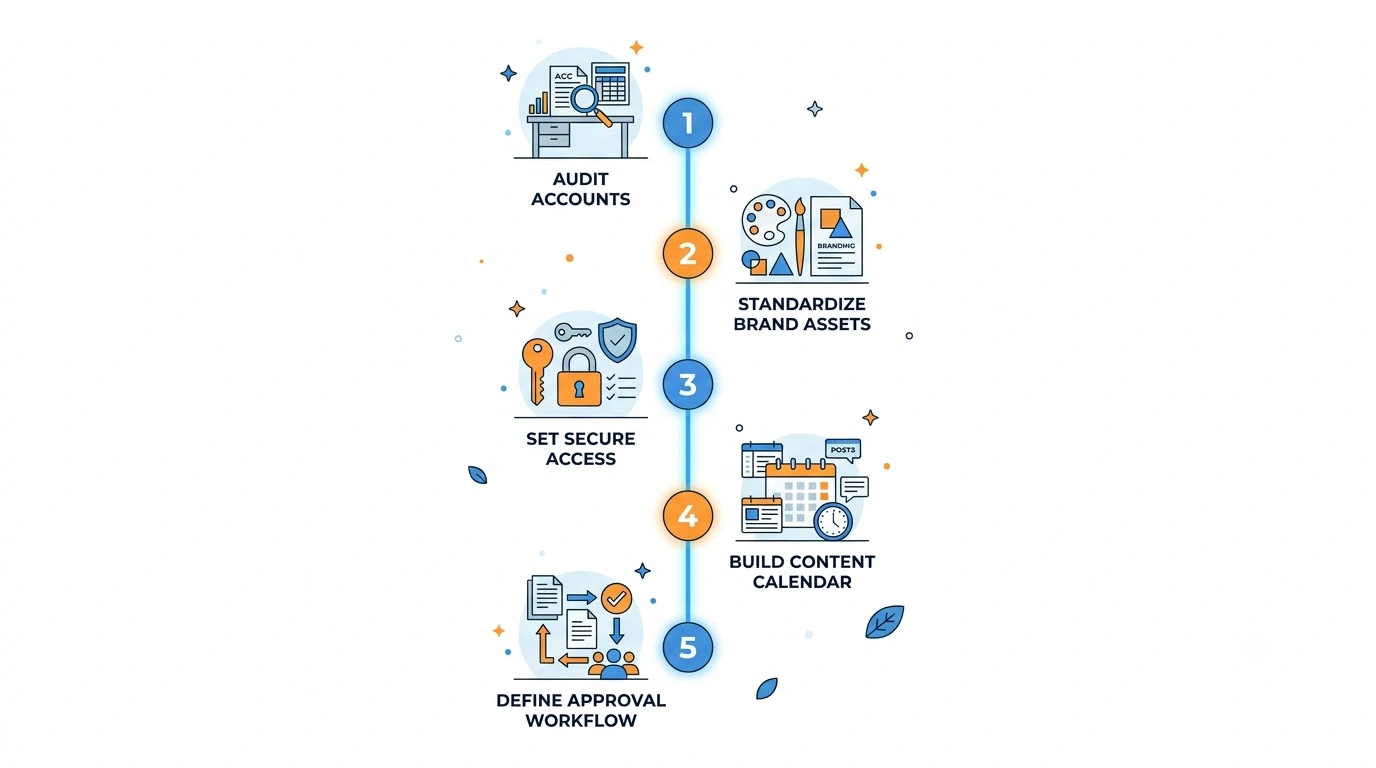
A simple 5-step process for setting up a system to manage multiple social media accounts, from account audits to approval workflows.
Building a system keeps you from feeling overwhelmed by daily posting tasks. Here is the exact process I use to set up a stress-free routine.
Step 1: Define Your Goals
Decide exactly what you want your profiles to do. Are you trying to share local care resources? Do you want to connect seniors with local volunteers? Write down your main goal in one simple sentence. Keep this goal in mind every time you write a post.
Step 2: Choose Your Key Platforms
Don’t join every new app that comes out. Go only where your community spends their time. Seniors and older caregivers usually prefer Facebook. Younger family members might look for quick updates on other visual platforms. Pick two platforms that match your audience and stick to them.
Step 3: Create a Content Calendar
A calendar is your map for the month. You don’t need fancy software for this step. A simple paper planner or a basic spreadsheet works perfectly. Write down what you’ll post on each day of the week. For example, Mondays can be for caregiving tips, and Wednesdays can be for local event updates.
| Day of the Week | Post Topic | Platform A (Facebook) | Platform B (Other) |
| Monday | Caregiver Tips | Long-form story | Quick tip image |
| Wednesday | Local Events | Event link & details | Graphic flyer |
| Friday | Community Story | Warm photo & quote | Short video clip |
Step 4: Set Up an Approval Workflow
If you share your admin duties with another volunteer, you need a clear review step. An approval workflow ensures that no post goes public without a second pair of eyes. This step prevents spelling mistakes and protects the privacy of the people you care for. Keep a shared folder where draft posts sit until they get approved.
7 Proven Strategies to Manage Multiple Accounts Efficiently
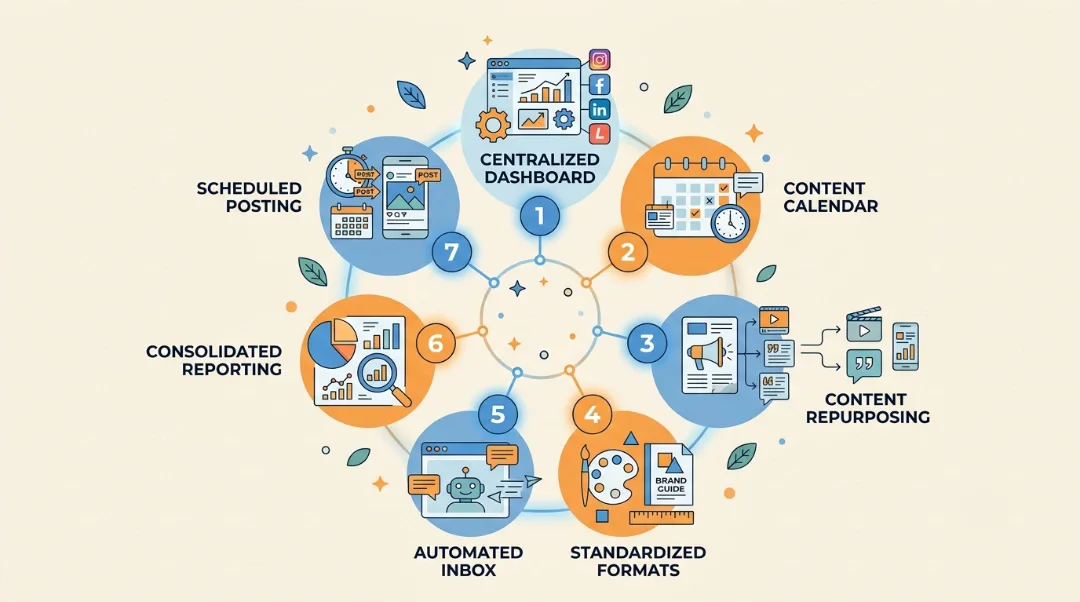
Seven proven strategies that make it easier to manage multiple social media accounts, from centralized dashboards to consolidated reporting.
Here’s where the day-to-day work gets easier. These strategies work whether you’re handling three accounts or thirty.
1. Centralize Everything in One Dashboard
Native apps weren’t built for people managing several accounts at once. A dedicated social media dashboard connects every platform into a single login, cutting out the constant sign-in, sign-out cycle that eats your morning.
2. Build a Real Content Calendar
Tag posts by platform, campaign, and approval status so nothing gets published twice or missed entirely. Set recurring slots for evergreen content types, like a weekly tip post or a monthly recap, so you’re not starting from a blank page every time.
3. Repurpose Content Across Platforms
Not everything needs to be created from scratch. Content repurposing means one blog post becomes a LinkedIn carousel, a short X thread, and a couple of Instagram Stories. A single webinar can be chopped into ten short clips for TikTok and YouTube Shorts. This is one of the fastest ways to keep every account active without doubling your workload.
4. Standardize Formats, Adapt Tone
Build four or five core post types you reuse: customer stories, quick tips, behind-the-scenes, and product spotlights work well for most brands. Keep the format consistent while adjusting the tone per platform. Professional on LinkedIn, conversational on Instagram, quick and sharp on X.
5. Automate Your Inbox Without Losing the Human Touch
A unified inbox pulls comments, mentions, and DMs from every platform into one place. Set up automatic replies for common questions like hours, pricing, or return policies, but always leave a clear path to a real person for anything more complex.
6. Consolidate Your Reporting
Pull analytics from every channel into one report instead of comparing five separate dashboards. This is the only way to see which platform actually drives results and which one is quietly wasting your time.
7. Schedule Content in Advance, But Leave Room to React
Social media scheduling tools let you queue content weeks or months ahead, freeing up your daily time for engagement instead of publishing. Just don’t schedule so far out that you can’t react to breaking news, trending topics, or something happening in real time that your audience actually cares about.
Cross-platform posting works best when you treat scheduling as a starting point, not a set-and-forget system. Check in weekly to adjust for anything that’s changed.
Best Tools to Manage Multiple Social Media Accounts
The right tool depends on your account count, your budget, and whether you’re managing your own brand or a roster of clients.
| Tool | Best For | Standout Feature |
| Buffer | Solopreneurs and small brands | Simple scheduling, clean interface |
| Hootsuite | Mid-size teams | Wide platform support, solid analytics |
| Agorapulse | Agencies with multiple clients | Shared client calendars, approval workflows |
| Sprinklr | Enterprise teams | Unified inbox, listening, and reporting at scale |
| Later | Visual-first brands | Strong Instagram and TikTok scheduling |
| SocialPilot | Budget-conscious agencies | Affordable client management plans |
If you’re just starting out with two or three accounts, a free or low-cost tool like Buffer is usually enough. Once you cross into double-digit accounts or start managing clients, the approval workflows and role-based permissions in something like Agorapulse or Sprinklr start to pay for themselves in saved time alone.
Whatever you pick, make sure it connects to every platform you actually use. A tool that only supports four networks isn’t much help if you’re active on seven.
Before you commit to a subscription, run a short trial with your actual content, not a demo template. Schedule a real week of posts, test the approval flow with your team, and check how the inbox handles a busy day. Most platforms offer a free trial long enough to catch problems before you’re locked into a yearly plan. Pay attention to how the tool handles image cropping and character limits per platform too, since a caption that looks fine on the editor screen can get cut off or resized awkwardly once it’s live.
Price matters, but the real cost of a tool is how much time it saves your team each week. A slightly pricier platform that cuts two hours off your daily routine is worth more than a cheap one that still leaves you copying captions by hand.
Common Mistakes to Avoid
A few habits quietly undo all the planning above. Watch for these.
- Posting the exact same content everywhere. What works on LinkedIn often falls flat on TikTok. Adjust the format, not just the caption.
- Skipping the approval step to save time. This is exactly how wrong pricing, outdated promo codes, and typos end up live for hours before anyone notices.
- Ignoring engagement after scheduling a post. Automation handles publishing, not conversation. Someone still needs to show up and respond.
- Letting old, unused accounts sit live. An abandoned profile with a two-year-old post looks worse than no profile at all.
- Never checking combined analytics. If you only look at each platform in isolation, you’ll keep spending time on the channel that’s not actually working.
Final Thoughts
Managing multiple social media accounts isn’t about working harder, it’s about building a system once and letting it carry the daily load. Get your calendar, approval workflow, and reporting set up properly, and the rest starts to feel routine instead of overwhelming.
If you’d rather hand this off to people who do it full time, Local Pro 1 offers Social Media Optimization Services built for businesses juggling exactly this kind of workload. Contact us if you want a second set of hands on your accounts.
FAQs
Is it safe to manage multiple accounts from one tool?
Yes, as long as you use a reputable platform with two-factor authentication and role-based access. This is actually safer than sharing raw passwords over email or text, since you can revoke access instantly when someone leaves the team.
What’s the best way to manage multiple social media accounts on a small budget?
Start with a free-tier scheduling tool, build a simple shared calendar in Google Sheets, and add paid features only once you outgrow the basics. Most solo operators and small businesses can run three to five accounts this way without spending anything.
How do I manage multiple social media accounts for business without hiring more staff?
Lean on scheduling, content repurposing, and a unified inbox. These three alone can cut the manual workload enough for one or two people to handle what used to take a full team.
Can I use the same content across every platform?
You can reuse the core idea, but adjust the format and tone for each platform. Straight copy-paste content usually underperforms because it ignores how differently people use each app.
How often should I review my social media management system?
Check your calendar and workflow weekly, and do a deeper review of your tools and processes every quarter. Platforms change their features often enough that a system built six months ago might already have a faster or cheaper way to run it.
