



- Your cart is empty Browse Shop
What Is GMB? | Google Business Profile Explained
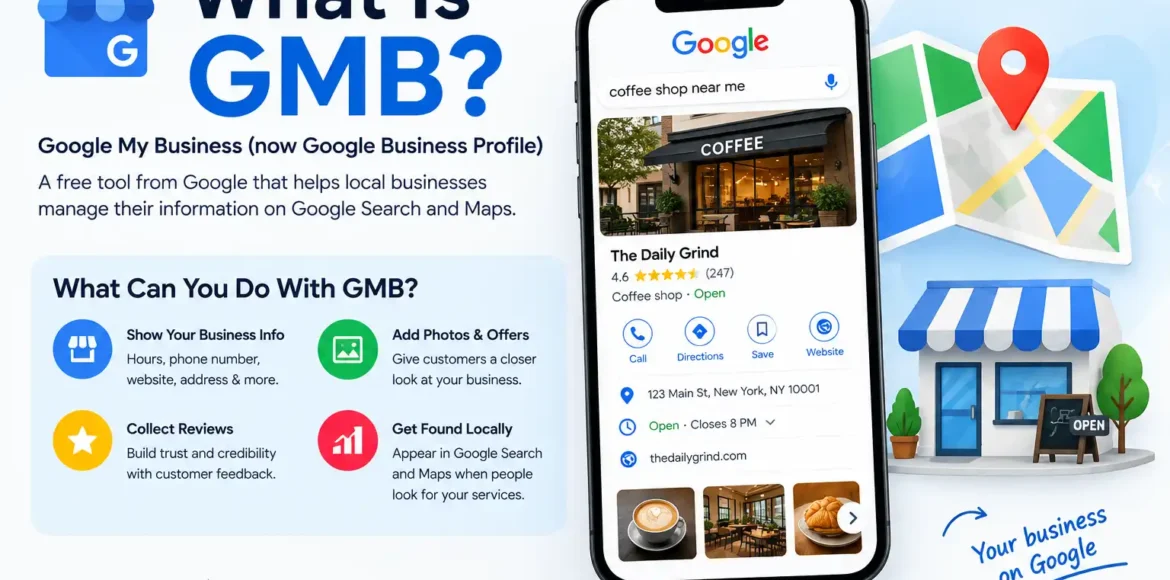
GMB stands for Google My Business. It was Google’s former name for its business listing platform. Today, Google calls it Google Business Profile.
A Business Profile gives an eligible local business a presence on Google Search and Google Maps. Business owners can provide information such as their business name, hours, phone number, website, location or service area, photos, and other relevant details. Customers can also see and interact with reviews.
For example, imagine someone searches Google for “plumber near me.” Google may show local businesses that match the search. Their Business Profiles can display useful information that helps the person decide which business to contact.
Quick Answer
GMB stands for Google My Business, the former name for what Google now calls Google Business Profile. It is a free Google tool that lets eligible businesses manage how their business information appears on Google Search and Maps, including hours, phone number, website, photos, services, and customer reviews.
What Does GMB Stand For?

GMB stands for Google My Business.
Google changed the name from Google My Business to Google Business Profile. Because the old term remains common in SEO and local marketing, people still search for phrases such as:
- GMB
- GMB Google
- Google My Business
- What is a GMB?
- GMB listing
- GMB marketing
- GMB optimization
If you see “GMB” in an SEO article, marketing proposal, or conversation with a local SEO professional, it will usually refer to a Google Business Profile.
Is GMB Still Called Google My Business?
No. Google Business Profile is the current name.
The term “GMB” is still widely used because Google My Business was the previous name of the product. Google’s current documentation refers to it as Business Profile or Google Business Profile.
This distinction matters when researching current instructions because older articles may use screenshots, terminology, or processes that no longer match Google’s current interface.
What Does a Google Business Profile Do?
A Google Business Profile helps eligible businesses control important information customers may see on Google Search and Maps.
Depending on the business and its profile, information can include:
- Business name
- Business category
- Address
- Service area
- Phone number
- Website
- Business hours
- Photos and videos
- Customer reviews
- Services
- Other business attributes
Google explains that Business Profiles can also direct customers to websites, booking links, social profiles, and other useful destinations.
Think of the profile as a digital local storefront on Google. It gives potential customers basic information before they decide whether to visit, call, request service, or learn more.
Why Does a Local Business Need GMB?
A local business can use Google Business Profile to make important business information easier for customers to find when they search on Google.
For example, a customer might search:
“auto glass repair near me”
A relevant local business profile can potentially show information such as its phone number, hours, location or service area, website, photos, and reviews.
The value is not simply having a listing. The information needs to accurately represent the business and make it easier for customers to understand what the business offers.
Google recommends keeping Business Profile information complete and accurate. It also identifies relevance, distance, and prominence as the main factors in local ranking.
GMB Can Help Customers Find Basic Business Information
A customer often wants an answer to a simple question:
“Can this business help me, and how do I contact it?”
A properly maintained profile can make those answers easier to find.
GMB Can Support Local Search Visibility
Google uses Business Profile information as part of its local search ecosystem. Accurate business information helps Google understand the business and match it with relevant local searches.
However, having a profile does not guarantee a specific ranking position.
GMB Can Build Customer Confidence
Customers can see information such as photos and reviews before contacting a business. Businesses can also respond to customer reviews through their profiles.
What Information Can You Add to GMB?
A useful Business Profile should give customers enough information to understand the business without making them search through several different websites.
Important profile information may include:
| Profile Element | Why It Matters |
| Business name | Identifies the business |
| Category | Helps describe what the business does |
| Phone number | Gives customers a direct contact option |
| Website | Provides additional information |
| Hours | Shows when the business is available |
| Address or service area | Helps customers understand where the business operates |
| Photos | Gives customers visual information |
| Reviews | Shows customer feedback |
| Services | Explains what the business offers |
Google also notes that information in local profiles can come from multiple sources, including business owners, users, public web content, and third-party data.
That means businesses should regularly check their information instead of assuming that every detail will remain exactly as originally entered.
How Does GMB Help With Local SEO?
GMB and local SEO are closely connected, but they are not the same thing.
Local SEO is the broader process of improving a business’s visibility for searches connected to a specific location. Google Business Profile is one important part of that local presence.
Google says local results are mainly based on relevance, distance, and prominence.
Relevance
Relevance refers to how well the business matches what the customer searched for.
Complete and accurate business information can help Google understand what the business does.
Distance
Distance considers how far the business is from the location associated with the search.
This is particularly important for local searches such as “dentist near me” or “plumber in Brooklyn.”
Prominence
Prominence relates to how well-known a business is. Google says prominence can be influenced by information it has about the business across the web, as well as factors such as reviews.
These factors work together. A business cannot simply add a few keywords to its profile and expect guaranteed top placement.
What Is GMB Marketing?
GMB marketing generally refers to marketing activities focused on improving a business’s presence and customer interactions through its Google Business Profile.
It can include activities such as:
- Keeping business information accurate
- Choosing appropriate business categories
- Adding useful photos
- Maintaining service information
- Monitoring customer reviews
- Responding to reviews
- Checking profile performance
- Keeping business hours current
- Connecting customers with the business website or booking options
The goal is not to manipulate Google. It is to make the business information useful, accurate, and relevant to customers.
For example, a local HVAC company could use its profile to clearly communicate its service area, operating hours, services, phone number, website, photos, and customer reviews.
Businesses looking for more structured local search support may also explore GMB Optimization Services in New York to improve how their Business Profile is organized and maintained.
Who Can Use Google Business Profile?
Google Business Profile is designed for eligible businesses that interact with customers in person.
This includes businesses with a physical location that customers can visit and service-area businesses that travel to customers. Google specifically states that online-only businesses that do not have a physical location customers can visit or provide in-person services are not eligible for a Business Profile.
Examples can include:
- Plumbers
- Electricians
- Restaurants
- Auto repair businesses
- Dentists
- Retail stores
- Contractors
- Cleaning companies
- Other local service providers
Eligibility depends on Google’s guidelines, so businesses should check the current requirements before creating or claiming a profile.
Is GMB Free?
Yes. Google states that businesses can add or claim a Business Profile at no charge.
That does not mean every activity associated with local marketing is free.
For example, a business may choose to pay an SEO agency or local marketing company for services such as profile optimization, local SEO, content, citation management, or reputation management.
The Google Business Profile itself, however, is available without a profile-management fee from Google.
GMB vs. Google Ads: Are They the Same?
No.
Google Business Profile is a business listing and presence on Google Search and Maps.
Google Ads is Google’s paid advertising platform.
A Business Profile can help customers discover and learn about a local business organically. Google Ads can be used to pay for advertising placements.
These tools can work alongside each other, but they serve different purposes.
A business does not need to treat its Business Profile as an advertisement. Its primary purpose is to provide accurate information about an eligible business and make that information accessible to customers on Google’s platforms.
How Do You Get Started With GMB?
If you are starting from scratch, the process generally involves adding or claiming the business and completing Google’s verification process.
Google’s current guidance includes these basic steps:
- Add or claim the business.
- Provide the requested business information.
- Complete Google’s verification process.
- Review the profile information.
- Keep important business details updated.
- Monitor customer interactions and reviews.
Google provides an official process for adding or claiming a Business Profile.
Once verified, owners and managers can manage profile information and other available features.
Common GMB Mistakes to Avoid
A Business Profile can be useful, but poor management can create an inaccurate or confusing customer experience.
Outdated Business Hours
If customers arrive expecting the business to be open and find it closed, the profile has failed at one of its most basic jobs.
Keep regular and special hours updated.
Incorrect Contact Information
An incorrect phone number or website can send potential customers somewhere they cannot get help.
Check contact information regularly.
Ignoring Reviews
Reviews are part of the information customers use when evaluating local businesses. Responding appropriately also gives a business an opportunity to communicate with customers.
Treating GMB as a Keyword Field
Adding keywords unnaturally is not the purpose of a Business Profile.
Business information should accurately represent the real business, its services, and its location.
Assuming a Profile Guarantees Rankings
There is no guaranteed top position simply because a business has a verified profile. Google explicitly states that local ranking is based on multiple factors and that businesses cannot pay Google for a better local ranking.
How Can You Tell If Your GMB Profile Is Working?
Google provides performance information for verified Business Profiles.
Business owners and managers can use available performance data to understand how customers discover the profile through Search and Maps and what actions they take.
Depending on the available reporting, this can help a business understand whether people are finding the profile and interacting with it.
The useful question is not simply:
“How many people saw my profile?”
It is also:
“What did people do after finding my business?”
Calls, website visits, directions, bookings, and other available interactions can provide more useful business context than visibility alone.
Key Takeaways
- GMB means Google My Business, the former name for Google Business Profile.
- Google Business Profile helps eligible businesses manage their presence on Google Search and Maps.
- Businesses can provide information such as hours, phone number, website, photos, services, location, and reviews.
- GMB can support local search visibility, but having a profile does not guarantee a particular ranking.
- Google says local results are primarily influenced by relevance, distance, and prominence.
- Keeping business information accurate and useful is an important part of managing a Business Profile.
Conclusion
So, what is GMB? GMB is the former name for Google Business Profile, Google’s platform for helping eligible businesses manage how their business information appears across Search and Maps.
For a local business, the value goes beyond simply creating a listing. Accurate information, appropriate business details, useful photos, customer reviews, and ongoing profile management can create a clearer experience for both Google and potential customers.
If you are building a local search presence, LocalPro1 can help you understand where Google Business Profile fits into a broader local marketing strategy and how your profile can be managed alongside your website and other local SEO efforts.
Frequently Asked Questions
What is GMB?
GMB stands for Google My Business, the former name of Google Business Profile. It is Google’s platform for eligible businesses to manage their business information and presence on Search and Maps.
What is a GMB profile called now?
It is now called a Google Business Profile. GMB and Google My Business are still commonly used terms because they were the former name of the platform.
Is GMB the same as Google Business Profile?
Yes. GMB is the former terminology, while Google Business Profile is the current name used by Google.
What does GMB do for a business?
A Business Profile allows an eligible business to manage information that customers may see on Google Search and Maps, including business hours, contact information, website, photos, services, location or service area, and reviews.
Is GMB free?
Yes. Google allows eligible businesses to add or claim a Business Profile at no charge.
Is GMB important for local SEO?
A Business Profile can be an important part of a local SEO strategy because it helps Google and customers access information about an eligible local business. However, local ranking depends on multiple factors, including relevance, distance, and prominence.
Can a service-area business use GMB?
Yes. Google says eligible service-area businesses that visit customers in person can use a Business Profile.
Does having a GMB profile guarantee better Google rankings?
No. Google does not guarantee a particular local ranking position. Local results are primarily influenced by relevance, distance, and prominence.
